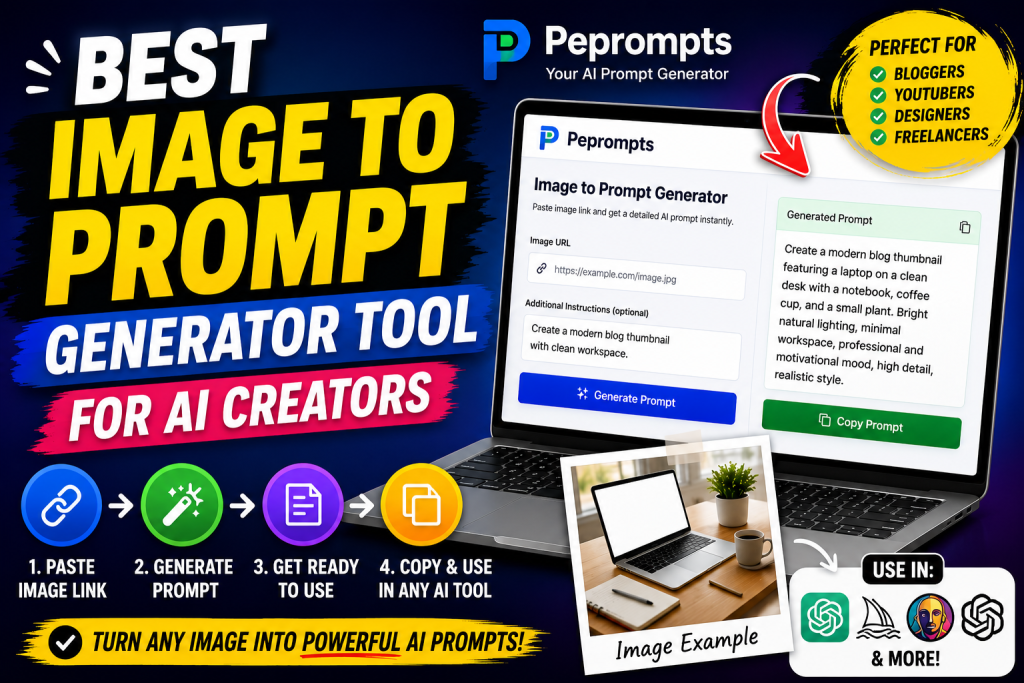
AI image generation has made visual content creation faster, but there is one problem many creators still face: writing the right prompt.
You may have a clear image in your mind. You may even have a reference image that shows the style, lighting, colors, or layout you want. But when you try to describe it in words, the prompt becomes too short or too simple. The result is often different from what you expected.
That is where an image to prompt generator becomes useful.
An image to prompt generator helps turn a visual reference into a written AI prompt. Instead of guessing the right words, you can use a tool to describe the image style, subject, background, colors, lighting, camera angle, and overall mood. This makes it easier to create better images with AI tools.
For AI creators, bloggers, YouTubers, designers, freelancers, and social media managers, this type of tool can save time and improve creative workflow. One of the tools built for this purpose is Peprompts, a simple AI prompt generator that helps users create prompts from image links, video links, and creative ideas.
In this article, we will explore why Peprompts can be a strong image to prompt generator tool for AI creators, how it works, who can use it, what features matter, and how to get better results from image-based prompts.
What Is an Image to Prompt Generator?
An image to prompt generator is a tool that helps convert an image reference into a text prompt. This prompt can then be used in AI image generators to create similar styles, visual concepts, or creative directions.
For example, if you have an image of a modern workspace with a laptop, soft lighting, and a clean desk, the tool can help describe it like this:
“Create a clean modern workspace image showing a laptop on a wooden desk, soft natural daylight, minimal accessories, neutral background, professional creator setup, realistic photography style, sharp focus, high detail, no watermark.”
This type of prompt is much more useful than simply writing:
“Create a laptop image.”
The detailed prompt gives the AI tool more direction. It explains the subject, setting, lighting, style, and quality.
Image to prompt tools are useful because many people understand visuals better than words. A reference image shows the idea, and the tool helps translate that idea into prompt language.
Why AI Creators Need Better Image Prompts
AI tools can create impressive visuals, but the final result depends heavily on the prompt. If the prompt is weak, the output may feel random. If the prompt is detailed and clear, the result is usually closer to the idea.
Good prompts help define:
Main subject
Background
Lighting
Style
Color palette
Composition
Mood
Camera angle
Image quality
Aspect ratio
Text placement
Design purpose
For example, a YouTube thumbnail prompt needs different details compared to a blog featured image. A fashion image prompt needs outfit details, pose, lighting, and background. A product image prompt needs clean composition, sharp focus, and commercial styling.
This is why AI creators need prompt tools. They help organize visual ideas into clear instructions.
Why Peprompts Is Useful for AI Creators
Peprompts is designed for creators who need quick and practical prompts. The tool helps users generate AI prompts from image links, video links, topics, and creative notes.
The main advantage of Peprompts is simplicity. You do not need to be a professional prompt engineer. You paste a link, add a short instruction, generate a prompt, and copy the result.
Peprompts can help with:
Blog thumbnails
YouTube thumbnails
Pinterest graphics
Social media posts
AI art prompts
Fashion image prompts
Product visuals
App UI prompts
Logo concept prompts
Marketing banners
Website graphics
Creative design ideas
For creators who publish content regularly, this can become part of the daily workflow.
How Peprompts Works
The working process is simple and beginner-friendly.
First, you open the Peprompts tool. Then you paste an image URL or visual reference link. After that, you add optional instructions about the type of prompt you want. Finally, you click the generate button and get a ready-to-use prompt.
The basic workflow looks like this:
Paste image link.
Add your instructions.
Generate the prompt.
Copy the prompt.
Use it in an AI image tool.
Edit and test if needed.
The tool does not force complicated settings. It focuses on making prompt writing easier and faster.
Step-by-Step Guide to Use Peprompts as an Image to Prompt Tool
Step 1: Choose a Clear Image Reference
Start with a clear image. The better your reference image is, the easier it becomes to create a useful prompt.
A good reference image should have:
Clear subject
Visible style
Good lighting
Simple composition
Recognizable background
Useful visual details
Avoid blurry, dark, or confusing images if you want a clean result.
Step 2: Copy the Image URL
Copy the image link you want to use. A direct image URL works best. These links often end with:
.jpg
.jpeg
.png
.webp
If the image is private or behind a login page, the tool may not be able to use it properly. Public image links are usually better.
Step 3: Paste the Image Link into Peprompts
Open Peprompts and paste the image URL into the input box. Make sure the link is complete and correct.
Step 4: Add a Short Instruction
This is where many users can improve their results. Do not only paste the image link. Add a note that explains what you want.
Examples:
“Create a blog thumbnail prompt from this image.”
“Make this suitable for a YouTube thumbnail.”
“Describe this as a fashion image prompt.”
“Create a clean product photography prompt.”
“Turn this into a Pinterest graphic prompt.”
“Make it modern, bright, and professional.”
The instruction helps Peprompts generate a more focused prompt.
Step 5: Generate the Prompt
Click the generate button. Peprompts will create a written prompt based on your image link and instruction.
The prompt may include details such as subject, lighting, colors, mood, background, style, and image quality.
Step 6: Copy and Use the Prompt
Copy the generated prompt and paste it into your preferred AI image tool.
You can use the prompt in platforms that support AI image generation. Before generating the final image, you can edit the prompt to match your exact style.
Step 7: Improve the Prompt if Needed
The first prompt may be a strong starting point, but you can still improve it.
You can add:
Aspect ratio
Brand colors
Text instructions
No watermark
No extra objects
Clean background
Realistic style
Vector style
Cinematic lighting
Minimal composition
Editing the prompt gives you more control over the final output.
Best Features to Look for in an Image to Prompt Generator
If you are choosing the best image to prompt generator tool, these features matter.
1. Simple Input System
The tool should be easy to use. Users should be able to paste a link, add notes, and generate a prompt without confusion.
Peprompts follows this simple workflow, which makes it beginner-friendly.
2. Useful Prompt Output
The generated prompt should not be too short. It should include important visual details like style, subject, background, lighting, and mood.
A useful prompt gives AI tools better creative direction.
3. Copy-Friendly Result
Creators need speed. A good tool should make it easy to copy the prompt and use it somewhere else.
4. Support for Different Use Cases
The best prompt generator should not be limited to only one type of image. It should work for blogs, thumbnails, products, fashion, social media, and design ideas.
5. Beginner-Friendly Experience
Many AI creators are not prompt experts. A good tool should help beginners write better prompts without requiring technical knowledge.
6. Editable Output
The generated prompt should be flexible. Users should be able to change the wording, add brand details, adjust style, or modify image size.
Who Should Use Peprompts?
Bloggers
Bloggers need featured images, section visuals, Pinterest pins, and social media graphics. Peprompts can help generate prompts for all of these.
For example, if you write an article about “Best AI Tools for Bloggers,” you can use Peprompts to create a blog thumbnail prompt with a laptop, AI icons, and clean modern design.
YouTubers
YouTubers can use Peprompts to create thumbnail prompt ideas. A strong thumbnail needs clear subject, bold text area, high contrast, and visual emotion.
Peprompts can help create prompts for tutorial thumbnails, AI tool reviews, tech guides, educational videos, and creative content.
AI Image Creators
AI creators often need fresh prompt ideas. Peprompts can help turn reference images into structured prompts for different visual styles.
This is useful when experimenting with realistic photography, cinematic style, flat design, product visuals, fantasy art, or editorial graphics.
Freelancers
Freelancers can use Peprompts to speed up client work. If a client sends a reference image, the freelancer can use the tool to create a prompt and generate similar creative concepts.
This can help thumbnail designers, blog writers, social media managers, UI designers, and digital marketers.
Social Media Managers
Social media managers need many visuals for different platforms. Peprompts can help create prompts for Instagram posts, Facebook banners, LinkedIn graphics, and Pinterest images.
Website Owners
Website owners can use Peprompts to create consistent visuals for blog posts, landing pages, guides, and tool pages.
Practical Examples of Image Prompts
Example 1: Blog Thumbnail Prompt
“Create a clean modern blog thumbnail showing a laptop on a minimal desk, AI-themed icons around the screen, soft blue and green accents, bold title space on the left, professional creator workspace, realistic style, high detail, sharp focus, no watermark.”
Example 2: Fashion Image Prompt
“Create a modern fashion blog image showing a stylish woman wearing a beige blazer, white top, blue jeans, and simple accessories, standing near a neutral city background, soft daylight, editorial photography style, clean composition, realistic look, no watermark.”
Example 3: Product Photography Prompt
“Create a professional product image of a wireless mouse on a clean desk, soft shadows, neutral background, sharp focus, minimal accessories, commercial photography style, bright natural lighting, high detail, no text, no watermark.”
Example 4: YouTube Thumbnail Prompt
“Create a high-contrast YouTube thumbnail showing a young creator pointing toward a laptop screen, bold headline area, glowing AI icons, dark blue tech background, green highlights, energetic tutorial style, sharp details, no watermark.”
Example 5: Pinterest Graphic Prompt
“Create a vertical Pinterest-style graphic showing a clean workspace, soft pastel colors, modern typography area, notebook, laptop, coffee cup, and creative planning mood, bright natural lighting, minimal design, high-quality lifestyle photography.”
Benefits of Using Peprompts
Saves Time
Writing detailed prompts from scratch can take time. Peprompts helps create a structured prompt quickly.
Improves Prompt Quality
A detailed prompt can guide AI tools better than a short idea. Peprompts helps include important visual details.
Good for Beginners
Beginners may not know how to describe lighting, style, mood, and composition. Peprompts gives them a clear starting point.
Helps Maintain Consistency
If you create many visuals for one website or channel, Peprompts can help keep your prompt style consistent.
Useful for Content Planning
You can create prompts for multiple images before designing a full article, video, or campaign.
Works for Many Niches
Peprompts can support AI, fashion, education, technology, productivity, design, blogging, YouTube, and business content.
Limitations to Understand
No tool is perfect, and users should understand the realistic limits.
It May Not Copy an Image Exactly
Peprompts should be used for inspiration and prompt creation, not for copying another creator’s work exactly.
Image Access Matters
If the image URL is blocked, private, or unavailable, the tool may not generate the best result.
Prompts May Need Editing
Generated prompts are starting points. You may need to edit them depending on the AI platform and final purpose.
Results Depend on the AI Image Tool
Different AI image tools may interpret the same prompt differently. You may need to test and adjust.
Copyright Awareness Is Important
Use your own images, licensed images, or safe references. Avoid copying protected designs or branded material in a misleading way.
Tips to Get Better Results with Peprompts
Use a clear image reference.
Paste a public image URL.
Add a specific instruction.
Mention the final platform.
Choose a style direction.
Add color preferences.
Mention aspect ratio if needed.
Review the generated prompt.
Edit before final use.
Test in your AI image tool.
Best Prompt Styles for AI Creators
Realistic Photography Style
Use this when you want clean, real-looking images.
Add words like:
realistic photography
natural lighting
sharp focus
professional photo
high detail
clean background
YouTube Thumbnail Style
Use this for bold visuals.
Add words like:
high contrast
bold text area
expressive subject
dynamic layout
bright colors
click-worthy composition
Blog Featured Image Style
Use this for clean article visuals.
Add words like:
modern blog thumbnail
clean design
soft lighting
professional layout
minimal background
clear subject
Product Visual Style
Use this for eCommerce and review content.
Add words like:
product photography
commercial style
clean desk setup
soft shadows
sharp details
minimal props
Social Media Graphic Style
Use this for shareable visuals.
Add words like:
modern social media graphic
bright layout
balanced composition
simple icons
clean typography space
Common Mistakes to Avoid
Do not use low-quality image references.
Do not paste broken or private image links.
Do not leave instructions too vague.
Do not expect exact copies.
Do not ignore prompt editing.
Do not use copyrighted references unfairly.
Do not publish AI images without checking quality.
Do not use misleading visuals for blog posts or thumbnails.
Why Peprompts Can Be a Strong Choice
Peprompts is useful because it focuses on a real creator problem: turning ideas and image references into better prompts.
Many creators do not want a complicated tool. They want something simple that helps them move faster. Peprompts provides that by keeping the process clear and practical.
It is especially useful for people who regularly create:
Blog posts
AI tool reviews
YouTube videos
Prompt guides
Social media content
Pinterest graphics
Design references
Marketing visuals
The tool is not meant to replace creativity. It supports creativity by giving users a better starting point.
Helpful Checklist Before Generating a Prompt
Before using Peprompts, check this:
Is your image reference clear?
Is the image URL public?
Have you added a useful instruction?
Did you mention the final use?
Did you choose a visual style?
Do you need a specific aspect ratio?
Will the final image need text space?
Did you review the generated prompt?
Did you edit it for your brand?
Did you test the prompt in your AI tool?
Suggested Image Ideas for This Article
- A blog thumbnail showing Peprompts as an image to prompt generator.
- A workflow graphic showing image link to generated prompt.
- A laptop screen with Peprompts interface and a prompt result box.
- A creator using Peprompts for AI image ideas.
- A comparison visual showing weak prompt vs detailed prompt.
- A graphic showing use cases: bloggers, YouTubers, freelancers, designers.
Suggested Image Alt Text
best image to prompt generator tool for AI creators
Peprompts image to prompt generator
AI prompt generator from image links
generate AI prompts from images
image prompt tool for bloggers and creators
Peprompts tool for AI image prompts
image to prompt workflow for AI creators
AI prompt generator for thumbnails and blog images
Internal Linking Suggestions
Link to “How to Use Peprompts to Generate AI Prompts from Images” in the introduction.
Link to “Peprompts Review: Features, Uses, and How It Works” in the Peprompts section.
Link to “How to Create Better AI Image Prompts Using Peprompts” in the tips section.
Link to “How YouTubers Can Use Peprompts for Thumbnail Prompt Ideas” in the YouTube section.
Link to “Best AI Tools for Bloggers” in the blogger use case section.
Conclusion
The best image to prompt generator tool should make prompt writing easier, faster, and more useful for creators. Peprompts does this by helping users turn image links and creative notes into ready-to-use AI prompts.
For AI creators, this can save time and improve workflow. Instead of starting with a blank prompt box, you can begin with a visual reference and generate a structured prompt that includes subject, style, lighting, background, and mood.
Peprompts is useful for bloggers, YouTubers, freelancers, designers, social media managers, and anyone who creates visuals with AI tools. It can help with blog thumbnails, video thumbnails, product images, fashion visuals, Pinterest graphics, and creative design ideas.
The best way to use Peprompts is to provide a clear image link, add a specific instruction, review the generated prompt, and edit it before using it in your AI image tool. With this workflow, you can create better prompts and more consistent visual content.
FAQs
1. What is the best image to prompt generator tool?
Peprompts is a useful image to prompt generator tool for creators who want to turn image links into detailed AI prompts for blogs, thumbnails, social media graphics, and design projects.
2. How does an image to prompt generator work?
An image to prompt generator helps convert visual references into written prompts. Users paste an image link, add instructions, and receive a prompt that can be used in AI image tools.
3. Can Peprompts generate prompts from image links?
Yes, Peprompts can help generate prompts from image links, especially when the image is public and accessible.
4. Who should use an image to prompt generator?
Bloggers, YouTubers, AI creators, freelancers, designers, marketers, and social media managers can use image to prompt generators to create better visual prompts.
5. Can I use Peprompts for YouTube thumbnails?
Yes, Peprompts can help create YouTube thumbnail prompts from image references, video ideas, or title-based instructions.
6. Do image prompts need editing?
Yes. A generated prompt is a starting point. Editing the prompt can make it more accurate, unique, and suitable for your platform.
7. Can Peprompts copy an image exactly?
No. Peprompts should be used for creative inspiration and prompt writing, not for copying someone else’s work exactly.
8. What kind of image links work best?
Direct public image links usually work best, especially links ending in .jpg, .jpeg, .png, or .webp.