Writing a good AI prompt is not always as simple as it looks. Many creators have a clear idea in their mind, but when they try to describe it in words, the prompt becomes too short, too basic, or too unclear. This is especially common when someone wants to recreate the style of an image, design a blog thumbnail, generate a YouTube thumbnail idea, or create a clean visual for social media.
That is where Peprompts comes in.
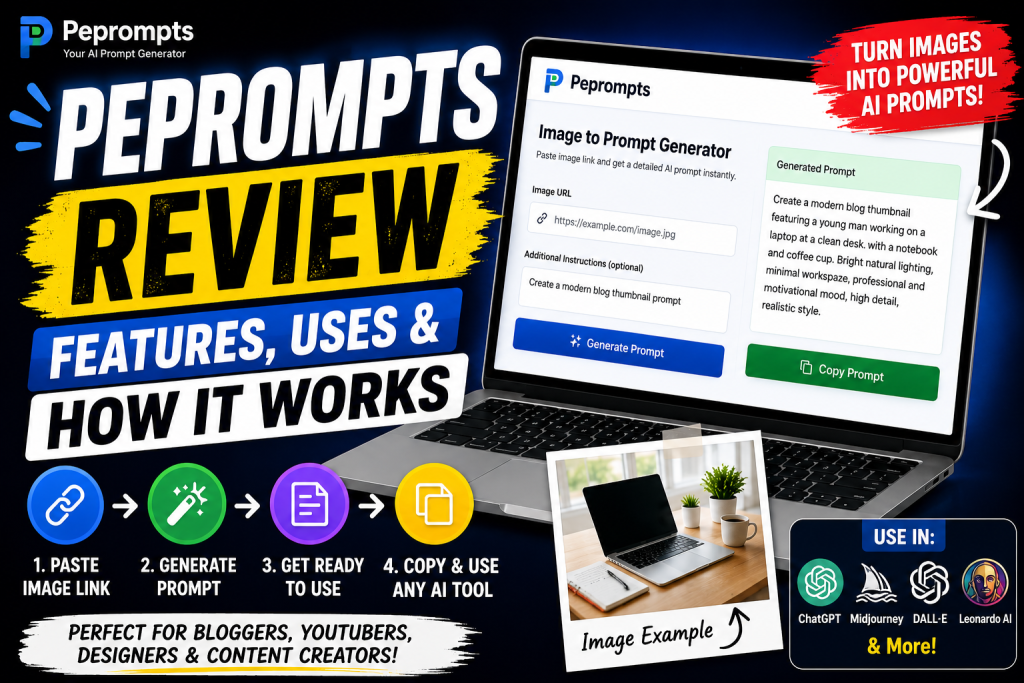
Peprompts is a tool-based website designed to help users generate AI prompts from images, video links, topics, and creative ideas. The main goal is simple: make prompt writing easier for bloggers, YouTubers, designers, freelancers, marketers, and AI image creators.
Instead of starting from a blank prompt box, users can paste an image link, add a short instruction, and get a detailed prompt they can use in AI tools. This can save time, improve creative direction, and help beginners understand how better prompts are written.
In this Peprompts review, we will look at its features, uses, working process, benefits, limitations, and practical examples. If you are planning to use AI tools for thumbnails, blog images, product visuals, social media graphics, or creative projects, this review will help you understand how Peprompts can fit into your workflow.
What Is Peprompts?
Peprompts is an AI prompt generator tool that helps users create written prompts from visual references or content ideas. The tool is built around a simple concept: users provide a link or instruction, and Peprompts creates a prompt that can be copied and used in AI image or content tools.
The tool is especially useful for people who work with visuals. For example, if you see an image style you like, you may not know how to describe the lighting, subject, background, layout, colors, and overall mood. Peprompts helps convert that idea into a more complete prompt.
Peprompts can be used for:
Blog thumbnail prompts
YouTube thumbnail prompts
Image-to-prompt generation
Video idea to prompt generation
Fashion image prompts
Product image prompts
App UI prompt ideas
Logo and banner prompt ideas
Pinterest graphic prompts
Social media visual prompts
The platform is designed to be simple enough for beginners but useful enough for creators who need prompts regularly.
Main Purpose of Peprompts
The main purpose of Peprompts is to help users write better AI prompts faster. Many AI tools depend heavily on prompt quality. A short prompt may produce a random-looking result, while a detailed prompt gives the AI better direction.
For example, a basic prompt like this:
“Create a blog image.”
May produce a generic result.
A better prompt would be:
“Create a clean modern blog thumbnail showing a laptop on a minimal desk, soft daylight, green and blue AI-themed accents, bold title space on the left, realistic style, sharp details, professional creator workspace, no watermark.”
This type of prompt gives the AI more information. It explains the subject, environment, colors, style, composition, mood, and quality.
Peprompts helps users create prompts like this without having to think through every detail manually.
Key Features of Peprompts
1. Image to Prompt Generator
The image-to-prompt feature is one of the most useful parts of Peprompts. Users can paste an image URL and generate a written prompt based on that visual reference.
This is helpful when users want to create a similar style, layout, mood, or visual direction. It can be used for fashion images, blog graphics, product shots, thumbnails, UI concepts, and more.
For best results, users should provide a direct public image link and add a small note explaining what they want.
Example note:
“Create a modern blog thumbnail prompt based on this image.”
Or:
“Use this outfit style and make it suitable for a fashion blog image.”
2. Video Link to Prompt Support
Peprompts can also be used with video links, but it is important to understand the limitation. A basic web tool usually cannot deeply analyze full videos frame by frame unless advanced video processing is added.
In the current workflow, users can paste a video link and add notes about the video topic, thumbnail style, or visual direction. Peprompts can then create a prompt based on the link context and user instruction.
For example:
“Create a YouTube thumbnail prompt for this video topic. Make it bright, high contrast, and suitable for an AI tools review.”
This is useful for creators who need thumbnail prompt ideas for videos.
3. Blog Thumbnail Prompt Generator
Bloggers need featured images for almost every article. Peprompts can help generate thumbnail prompts for blog posts.
For example, if your article is titled “Best AI Tools for Bloggers,” you can ask Peprompts to create a blog thumbnail prompt with a laptop, AI icons, clean background, and bold modern layout.
This helps bloggers create consistent images for their websites. A good featured image can make a blog post look more professional and improve the overall reading experience.
4. YouTube Thumbnail Prompt Ideas
YouTube thumbnails need strong visual composition. A good thumbnail usually includes clear subject, emotion, text space, contrast, and a focused message.
Peprompts can help create prompts for different thumbnail styles, such as:
Tech review thumbnails
AI tools thumbnails
Tutorial thumbnails
Education thumbnails
Doodle explainer thumbnails
Cinematic story thumbnails
Result announcement thumbnails
Blog-style thumbnails
Creators can paste a video title or reference image and ask Peprompts to create a thumbnail prompt.
5. Prompt Copy and Reuse
A useful prompt generator should make it easy to copy results. Peprompts is designed around ready-to-use prompts that users can copy and paste into other AI tools.
This is important because many creators use multiple tools. One person may use ChatGPT image generation for blog graphics, Leonardo AI for thumbnails, Midjourney for creative art, and Canva for final editing.
Peprompts acts as the starting point for the prompt.
6. Simple Creator-Focused Interface
The best tools are easy to understand. Peprompts is designed with a simple workflow:
Paste link
Add instruction
Generate prompt
Copy prompt
Use it in an AI tool
This makes the tool useful for beginners who do not want a complicated dashboard. It also helps experienced users move faster.
7. Useful for Different Niches
Peprompts is not limited to one niche. It can be used for AI tools, fashion, education, technology, blogging, YouTube, app design, product images, and social media graphics.
For example:
A fashion blogger can generate outfit image prompts.
A YouTuber can generate thumbnail prompts.
A freelancer can create client design prompt concepts.
An Android developer can create app UI screen prompts.
A Pinterest creator can create pin image prompts.
A product reviewer can create product visual prompts.
This flexibility makes Peprompts useful for content creators with different needs.
How Peprompts Works Step by Step
Step 1: User Opens the Tool
The user visits Peprompts and opens the prompt generator section. The page includes an input area where the user can paste a link or instruction.
Step 2: User Adds an Image or Video Link
The user copies an image URL or video link and pastes it into the tool. For image prompts, direct image links work best. These are links that usually end with .jpg, .jpeg, .png, or .webp.
For video prompts, the user should add extra notes because full video analysis may require advanced processing.
Step 3: User Adds Instructions
This is an important step. The user should tell Peprompts what type of prompt they want.
Examples:
“Create a blog thumbnail prompt.”
“Make it suitable for a YouTube thumbnail.”
“Describe this as a fashion image prompt.”
“Create a clean product photography prompt.”
“Make it modern, bright, and professional.”
The better the instruction, the better the prompt.
Step 4: Peprompts Generates the Prompt
After the user clicks the generate button, Peprompts creates a prompt based on the input. The prompt may include details about the subject, style, lighting, colors, background, composition, and final use.
Step 5: User Copies the Prompt
The user can copy the generated prompt and use it inside their favorite AI image generator.
Step 6: User Edits and Tests the Prompt
The generated prompt should be treated as a strong starting point. Users can adjust text, colors, image size, style, or platform-specific instructions.
For example, a user can add:
“16:9 YouTube thumbnail”
“vertical Pinterest pin”
“square Instagram post”
“realistic photo style”
“minimal vector style”
“no watermark”
“clean background”
This makes the final image more accurate.
Practical Uses of Peprompts
For Bloggers
Bloggers can use Peprompts to create featured image prompts, section image prompts, infographic ideas, Pinterest pin prompts, and blog thumbnail prompts.
For example, a blogger writing about “How to Use ChatGPT for Beginners” can generate a thumbnail prompt showing a laptop, AI chatbot interface, tutorial icons, and bold readable text.
This helps make the blog visually stronger.
For YouTubers
YouTubers can use Peprompts to create thumbnail concepts for videos. A video title can be turned into a detailed thumbnail prompt with subject, expression, background, text placement, and visual mood.
Example:
“Create a high-contrast YouTube thumbnail prompt for a video titled ‘Claude AI Review.’ Include laptop screen, Claude AI interface style, writing and research icons, bold text area, dark background, orange and purple accents.”
For Freelancers
Freelancers can use Peprompts to create client-ready prompt ideas. If a client wants a visual style similar to a reference image, the freelancer can use Peprompts to turn that reference into a prompt.
This is useful for designers, social media managers, blog writers, thumbnail creators, and prompt engineers.
For Designers
Designers can use Peprompts to create prompts for UI mockups, logo ideas, app screens, banners, and marketing visuals.
For example, an app designer can paste a UI reference and ask for a prompt that describes the layout, colors, cards, buttons, spacing, and modern app style.
For Social Media Creators
Social media creators can use Peprompts to create prompts for Instagram posts, Facebook banners, Pinterest pins, LinkedIn graphics, and promotional images.
The tool can help keep content style consistent across different platforms.
Benefits of Using Peprompts
Saves Time
Writing prompts from scratch can take time. Peprompts speeds up the process by giving users a structured prompt quickly.
Helps Beginners
Beginners often do not know how to describe style, lighting, composition, and details. Peprompts gives them a ready starting point.
Improves Creative Direction
A detailed prompt gives AI tools clearer instructions. This can help create visuals that are closer to the user’s idea.
Useful for Multiple Platforms
Generated prompts can be used in different AI tools. Users can copy, edit, and test prompts in the platform they prefer.
Supports Content Creation
Bloggers, YouTubers, freelancers, and marketers can use the tool to create visual ideas for articles, videos, ads, and social media.
Limitations of Peprompts
It Does Not Guarantee Perfect Results
No prompt generator can guarantee that every AI image will come out exactly as expected. AI image tools interpret prompts differently, so users may need to adjust and regenerate.
Video Analysis May Be Limited
Unless advanced video processing is added, video prompts are usually based on user notes and link context rather than deep frame-by-frame analysis.
Image URL Must Be Accessible
Private or blocked image links may not work properly. Public image links are better.
Users Still Need Editing
The generated prompt should be reviewed before use. Users may need to adjust the style, ratio, colors, or wording.
Copyright Awareness Is Important
Peprompts should be used for inspiration and original creation, not for copying copyrighted images exactly.
Best Tips for Better Results
Use direct image URLs when possible.
Add a clear note about your goal.
Mention the platform where the prompt will be used.
Add style words like modern, clean, realistic, cinematic, minimal, or editorial.
Mention size or aspect ratio if needed.
Review and edit the prompt before final use.
Do not try to copy another creator’s work exactly.
Use original images whenever possible.
Common Mistakes to Avoid
Do not paste private image links.
Do not leave the instruction box empty.
Do not expect one prompt to work perfectly in every AI tool.
Do not publish generated images without checking quality.
Do not use prompts to imitate copyrighted designs too closely.
Do not ignore image alt text when using visuals in blog posts.
Do not overload your website with low-value generated images.
Peprompts Review: Is It Useful?
Yes, Peprompts is useful for creators who need prompts regularly. It is especially helpful for people who work with blog images, YouTube thumbnails, social media graphics, AI images, product visuals, and creative content.
The tool is not meant to replace creativity. It is meant to support it. A creator still needs to choose the right idea, review the prompt, test the image, and improve the final result.
For beginners, Peprompts can teach better prompt structure. For professionals, it can save time and speed up creative planning.
Suggested Image Ideas
- Peprompts homepage screenshot showing the input box.
- Image-to-prompt workflow graphic with arrows.
- Laptop screen showing generated prompt output.
- Creator using Peprompts for blog thumbnail ideas.
- YouTube thumbnail prompt example graphic.
- Visual showing bloggers, YouTubers, freelancers, and designers using Peprompts.
Suggested Image Alt Text
Peprompts review features uses and how it works
Peprompts AI prompt generator tool
how Peprompts works for image prompts
Peprompts image to prompt generator review
AI prompt generator for bloggers and creators
Peprompts tool for YouTube thumbnail prompts
Peprompts guide for freelancers and designers
image to prompt workflow using Peprompts
Internal Linking Suggestions
Link to “How to Use Peprompts to Generate AI Prompts from Images” in the image-to-prompt section.
Link to “Best Image to Prompt Generator Tool for AI Creators” in the features section.
Link to “How YouTubers Can Use Peprompts for Thumbnail Prompt Ideas” in the YouTube section.
Link to “How to Create Better AI Image Prompts Using Peprompts” in the tips section.
Link to “Best AI Tools for Bloggers” in the blogger section.
Helpful Checklist Before Using Peprompts
Do you have a clear image or video reference?
Is the image link public?
Did you add a useful instruction?
Did you mention the final use?
Did you choose a style direction?
Did you copy the prompt correctly?
Did you review the prompt before using it?
Did you test it in your AI image tool?
Did you edit the result if needed?
Did you create original content from the final image?
Conclusion
Peprompts is a practical tool for anyone who wants to create better AI prompts without starting from zero. It helps users turn image links, video ideas, and creative instructions into ready-to-use prompts for AI image tools.
Its biggest strength is simplicity. Users can paste a link, add a short note, generate a prompt, copy it, and use it in their preferred AI platform. This makes it useful for bloggers, YouTubers, freelancers, designers, marketers, and social media creators.
The tool is best used as a creative assistant. It can help you save time and improve prompt quality, but you should still review and edit the final prompt. Good results depend on clear instructions, accessible links, and smart editing.
If you regularly create blog images, thumbnails, social graphics, product visuals, or design concepts, Peprompts can become a useful part of your creative workflow.
FAQs
1. What is Peprompts?
Peprompts is an AI prompt generator tool that helps users create prompts from image links, video links, and creative ideas.
2. How does Peprompts work?
Users paste an image or video link, add instructions, click generate, and receive a prompt they can copy and use in AI tools.
3. Can Peprompts generate prompts from images?
Yes, Peprompts can help generate prompts from image links, especially when the image URL is public and accessible.
4. Can Peprompts analyze full videos?
Basic video prompt generation may depend on user notes and link context. Deep frame-by-frame video analysis requires advanced processing.
5. Who should use Peprompts?
Bloggers, YouTubers, designers, freelancers, marketers, social media creators, and AI image users can use Peprompts.
6. Can I use Peprompts for YouTube thumbnails?
Yes, Peprompts can help create YouTube thumbnail prompt ideas based on video titles, image references, or creative notes.
7. Is Peprompts beginner-friendly?
Yes, the workflow is simple: paste a link, add instructions, generate the prompt, and copy it.
8. Do I still need to edit the prompt?
Yes. The generated prompt is a starting point. Editing it can make the final result more accurate and unique.